The too-many-compromises Garmin Watch
September 19, 2026
Back in 2024, I purchased a used Garmin Instinct 2X to track my exercises. Before the Garmin, I’d used an Apple Watch Series 4 since 2018, and the only reason I didn’t just go for another Apple Watch was because at the time, I was considering moving to Android. The watch also had a seriously degraded battery, and I knew that Apple would “replace” the battery with a refurbished model, not actually swapping just the battery itself. Maybe, the Garmin would let me economically use it for a long time by being more repair-friendly (although I never got to test this idea).
I wanted to see how pared-back of a watch I could live with. Since nearly all of the wearable manufacturers (at the time anyway) had focused on health as the main selling factor, I reasoned that any watch with a basic microprocessor inside that would just show time with seconds and capture health data from the various sensors on-board would be enough. Garmin watches fit the description, and better still, they were cross-platform.
Well, after using the watch for nearly 3 years now, here are some of my thoughts on Garmin watches.
Battery and charging
Garmin watches have really great battery life. Depending on the amount of features you enable, as well as whether you get a model with solar recharging, your runtime could range from a week to forever (asterisk: your battery not failing outright, of course).
Since I wanted all of the health metrics, of course I enabled all of the features, and with that, the Instinct 2X lasted about a week on average before needing to be charged. I found that I still put the watch on the charger while taking a shower, since the charging speed was rather slow, and going from 0% to 100% could take a while. Better to just utilize the off-time when the watch wouldn’t be that useful, with the water getting underneath the sensors.
However, with all of the features enabled, I might as well have gotten the model without the solar recharging, because it hardly made a dent in day-to-day use. Garmin has a section in the app where it shows you when you went outside to actually touch grass, but it was never ever going to be enough to bring up the charge even by 1% when all the features were enabled, and if anything, the slowing of discharge would’ve been within the margin of error that I wouldn’t have bothered.
I actually think that Garmin should drop solar charging entirely, because the people who wear Garmin watches and go for long stretches of workouts outside will want all the health metrics anyway, and by that point the half-watt (or probably less) power you can extract out of the solar cells would be absolutely insignificant compared to the rest of the power draw. And for people that do not need that data, they would still need to take their watch off every now and then.
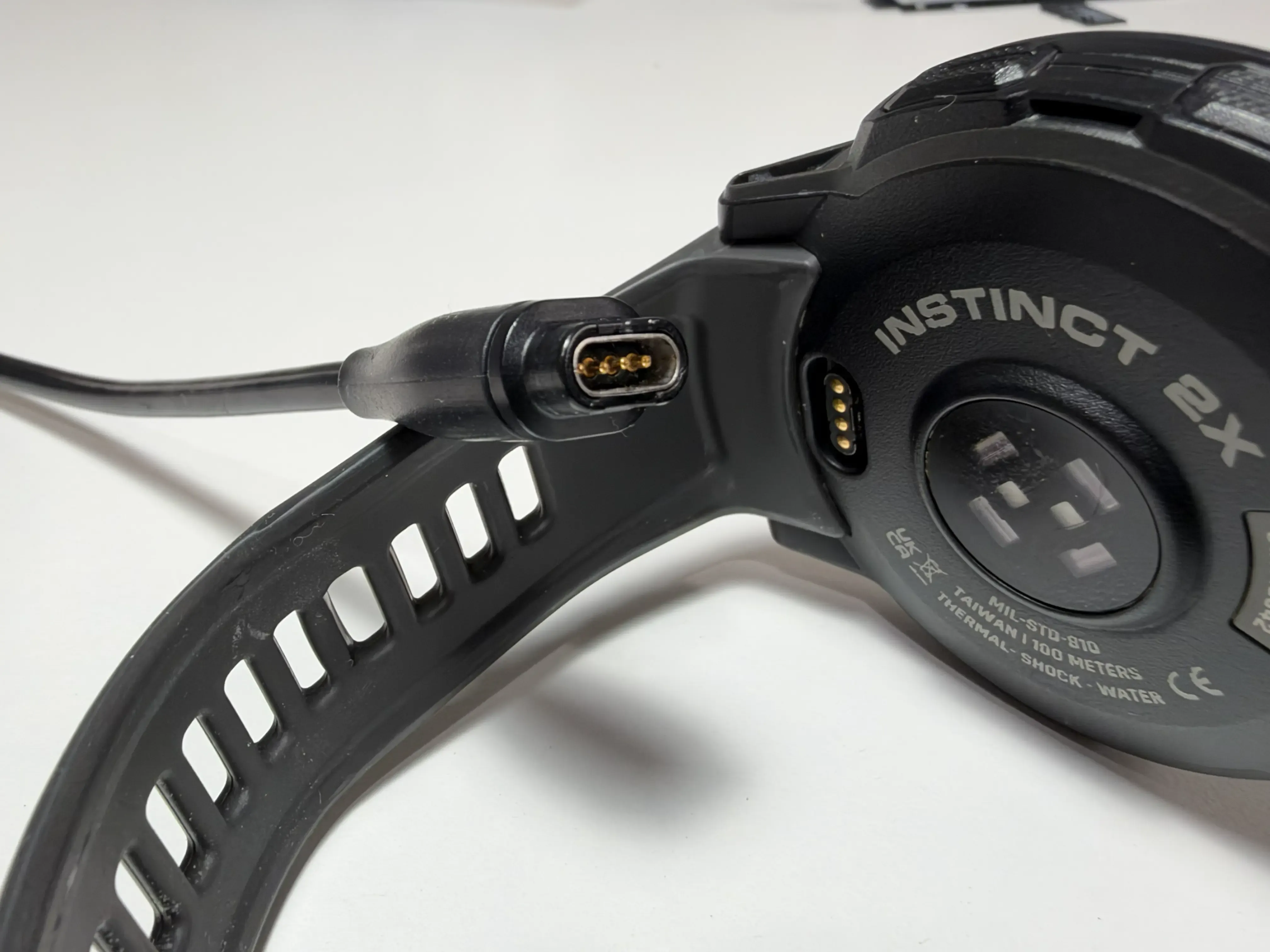
The charger itself was rather annoying, actually. Garmin watches have this pogo pin charger situation going on, and while it does click into place, I’ve found that sometimes it won’t make good contact, even with no debris or water in the port. I’ve come back from several showers thinking the watch would be charged, only to find it idling on the dresser because it never started.
Performance
In day-to-day use, the watch was actually pretty good with performance!
Since the display is monochrome and very pixel-ly, the watch doesn’t have to render much. That’s good, because the microprocessor inside wasn’t going to render much in the first place.
The only issue is, after the last couple of update cycles, the microprocessor would get overloaded during workouts and the inputs and screen updates would slow to a crawl. I would notice this whenever I finished a set and pressed the side button to record the reps, only for the watch to stop responding for 10 to 15 seconds.
Of course, when you try to reproduce the problem on video that never happens, so imagine the video clip below but with the hitch at the rep 8 mark lasting 15 seconds instead of 1.
And for some reason, saving has always taken forever with the Garmin. It’s at least a solid 20 seconds of waiting, looking at the spinning indicator, with no way to leave it going in the background or start another workout while it is processing. And then you actually have to initiate a sync within the Garmin app, because the data isn’t streamed real-time to the phone. (Which I do understand, because Bluetooth has limited bandwidth and I’m sure the watch uses some of it to communicate with the heart rate chest strap.)
I’ve had the Garmin completely freeze to the point where it required a force restart once or twice, but I’m giving it a pass here because I’m pretty sure Apple Watches also do that from time to time. And Android Wear watches. Unless you had some screenless wearable I think it’s unavoidable that you will get crashes and freezes here and there.
Health, workout tracking, sensor accuracy
Garmin watches show you this “Body Battery” metric, where it estimates how messed up your body is based on your sleep, your stress levels, your movement and activity, etc.
Not to brag, but I consistently hit the 5% mark nearly every single day. Why 5%? Because the Garmin never lets the value drop below the 5% mark. I think that’s rather silly, and they should commit to the bit and let it drop to zero when they detect that I am dead. (On a more serious note, then the 5% should be the new baseline zero. No point having 5% in reserve when your wearer is figuratively dying standing.)
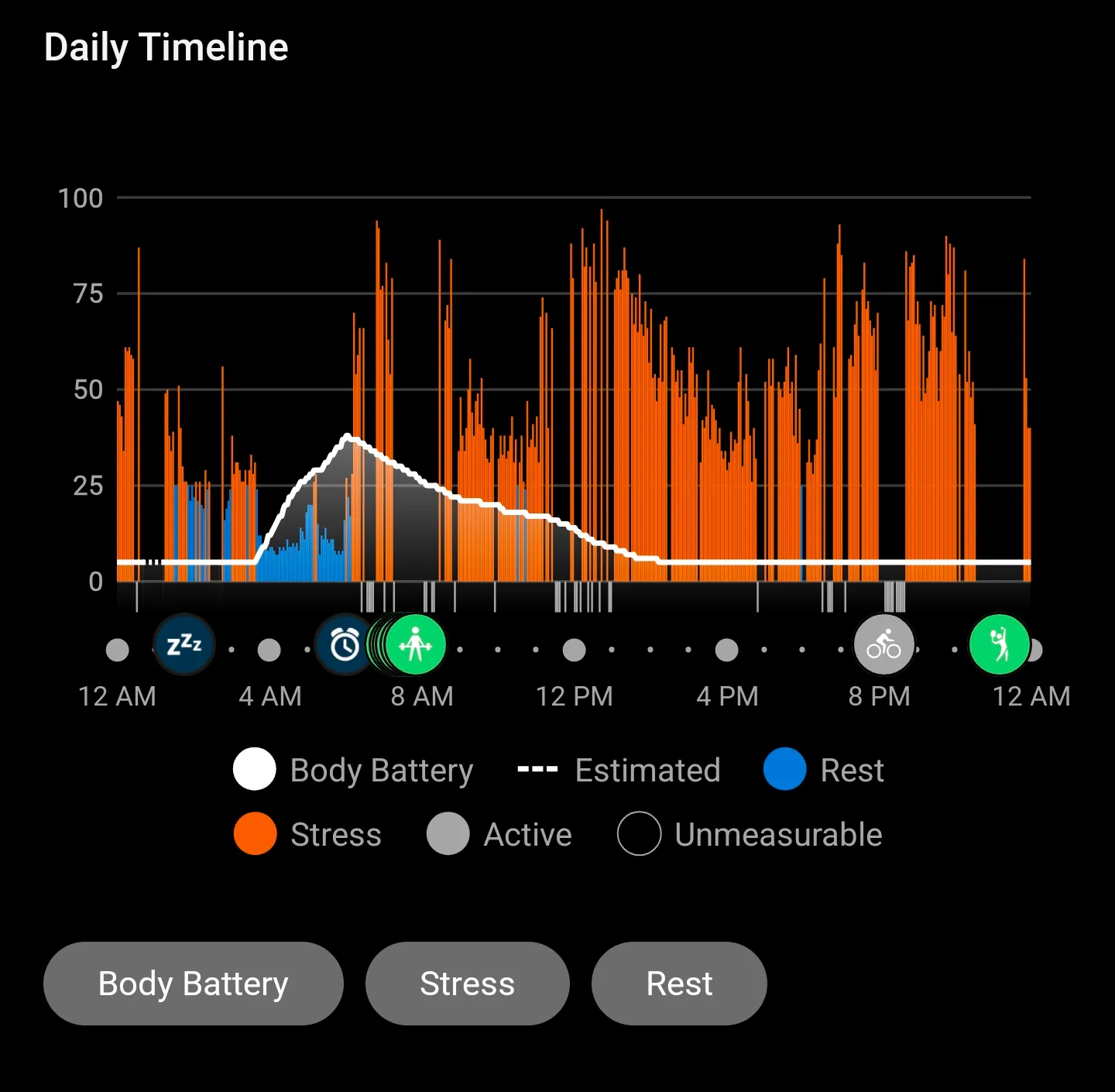
(And sorry, I said I wanted to track my health and made no commitments on improving it. Although the watch did help, somewhat!)
The heart rate sensor on the back flashes pretty colors (you aren’t supposed to stare at it, mind you), and reads heart rate info and blood oxygen levels. They were okay, but the accuracy was questionable. For activities where you moved or flicked your wrists around a lot (such as Beat Saber), or where you strained your wrist to the point where the blood vessels would get concealed from the sensor area (such as weights), the watch would struggle to update the heart rate consistently.
Of course, Garmin watches are compatible with heart rate straps, just like Apple watches. (And I think it’s criminal that Android Wear won’t support this by default.) So it became a non-issue during workouts because I would always wear my chest strap, but I’ve always wondered if the Garmin is accurate during the non-extremes, like daily routine and sleep tracking. I’ve never gotten bothered to the point of looking up the studies and conducting experiments myself, although I do know for a fact that there were several studies done comparing different wearable brands, so maybe go take a look once you’re done reading this post.
Notifications
Notification mirroring from my Android phone worked pretty well. I didn’t use this watch with iOS that much, so I’m not sure if it would work there as well, but if there are any notifications that aren’t mirrored that’s an Apple platform problem and not a Garmin problem.
On Android, after the initial ping on the phone, the Garmin would receive it after two to three seconds as the data streamed over Bluetooth. Oh, and I don’t think there is a way to stop getting notifications on your phone while you are wearing your watch, Apple Watch-style. The Garmin app just reads the notification from the notification monitoring API from Android and sends it across, not by intercepting it and suppressing it.
However, not all notifications would render correctly. Obviously, images were out of the question, but so were emojis and sometimes Korean text. I would get a ping and see a bunch of □□□□□□□ (or the so-called “tofus”), and then I’d have to dig out my phone because now you’ve piqued my interest.
And, of course, you can’t really reply to notifications. No Android smart reply suggestions, no typing (how would you with five buttons?), no taking phone calls on the wrist (although you can with non-Instinct models, or so I’ve heard).
If you’re buying a Garmin expecting it to reduce your phone usage just like an Apple Watch, I think the only feasible way would be to disable notifications altogether and pretend that you have the willpower to not touch your phone. Because ironicially, the limitations actually make you want to pick up your phone more, instead of quickly shooting off a reply and going about your work.
Other “smart” features
Garmin has a “Garmin Pay” feature, but it is so unusable that I don’t think they should bother. Compared to Apple and Android watches, the Garmin Pay feature requires you to (at least on the Instinct 2X):
- Hold down the light button
- Use the side buttons to scroll all the way to the Garmin Pay icon
- “Type” in your 4-digit PIN, using only the up and down buttons
- Select card and tap to pay
Try doing that at the self-checkout and see how many dirty looks you can catch.
Oh, and compared to Apple and Google Pay, not all cards are supported. Which could be a dealbreaker if you’re in a region where Garmin Pay isn’t supported at all, like Korea.
For 3rd-party apps, Garmin has an app store called Connect IQ. However, I never actually used the apps on it, or developed apps of my own for the Garmin. Garmin requires you to write apps using their proprietary language, Monkey C, and despite the name it’s not actually C-like. It’s more Java-like, but it has no type safety, which is an odd design choice.
I tried to use Sleep as Android’s Garmin app to track my sleep back when I used my Android phone, and the Garmin app would constantly crash, freeze, delete or lose sleep recording data, and lie about its current status. It was so bad, in fact, that I never managed to complete a night where the sleep session was completely tracked properly, start to finish.
Sure, it’s a sample size of one, and sure, maybe a great Android app doesn’t automatically mean the developer is skilled at writing Monkey C, but I saw similar crashy and annoying behavior when testing out an unofficial Home Assistant app on the Connect IQ store.
Is it unfair to criticize Garmin for 3rd-party apps and developers? Maybe, but they write the spec, the SDK, and do the app store hosting. And they are bringing in developers to work for them so that they could sell the watches. So just like the other app stores, I think they could at least do some testing and maybe give some feedback to developers on how they could avoid problems developing for their platform.
Other minor features that I missed:
- Remote camera shutter. Sure it can’t render a preview but at least let users send the volume-up signal! Even the cheapy Mi Bands could do it.
- ECG reading. The Instinct series do not have it
- Assistant functionality. I knew I wasn’t getting this, but I realized it’s really handy to bring up your wrist, say something to Siri/Google Assistant, and then carry about work without ever touching the watch itself.
Just to be clear, I bought the watch knowing that I wouldn’t get any of those features, and each one in isolation wasn’t such a big deal, but over time the annoyances did build up and I realized that I do utilize the functionality, compared to my initial estimates of not needing them that frequently.
Does that mean Garmin watches are bad?
No! I actually quite liked using my Garmin watch for the past 3 years. However, as mentioned above, for me and me specifically, I’ve found that I miss many of the comforts a regular smartwatch provides, and the Garmin starting to degrade doing core functionality like workout tracking convinced me to start looking for alternatives.
I ended up going back to an Apple Watch, and with the latest release they now support metrics that mimic what Garmin’s Body Battery was doing, and with much accurate sensors to boot. (At least, according to Apple anyway.)
If you read through this entire blog post and didn’t see the downsides, I’m sure you’ll be plenty happy with the Garmin watches. And they are genuinely fresh, while also being utilitarianly boring on purpose. I’ve lost count of how many people seemed genuinely interested when they saw my wrist and started asking questions about Garmin watches.
I think for the vast majority of people, however, the Garmin experience is filled with compromises, some more annoying than others, and hopefully this blog post helped you gauge how much you’re willing to live with them.