Taking another shot at the cheap IP camera, part 2
November 9, 2026
About a year ago, I ranted about this particular cheap IP camera that was based on some proprietary Chinese IoT platform named Tuya. After trying and failing to get a local video stream from it without going through their servers, I concluded that my time would be better served by using cameras that actually exposed their streaming capabilities, and set it aside.
Well, I recently dug the camera out while moving to my new job in New Jersey, and thought it might be worthwhile to give it another shot. I had plenty of spare time, and if I couldn’t figure it out, LLMs are recently all the rage for being really great at reverse-engineering things. But my initial goal was, I’d attempt it myself first, and then hand it off to an LLM if I failed and try and learn something from what it had figured out.
So what’s our goal, exactly? We know from last time that the camera has some sort of ONVIF server built in. That’s basically a standardized interface for IP cameras, defined by the Open Network Vision Interface Forum (or ONVIF!) And most ONVIF cameras expose their video streams using RTSP, or the Real-Time Streaming Protocol. You may have come across this protocol if you’ve ever streamed to a live-streaming platform like YouTube or Twitch.
The problem is that these servers are disabled on the firmware side, and their ports are closed off. Last time, we tried to enable them using the configuration options, but that didn’t work. Now, it’s time to figure out why that failed, and if there’s truly a way to enable those streams.
So with that in mind, let’s first extract the firmware image with binwalk -Me:
| Decimal | Hexadecimal | Description |
|---|---|---|
| 113992 | 0x1BD48 | CRC32 polynomial table, little endian |
| 458752 | 0x70000 | uImage firmware image, header size: 64 bytes, data size: 2803328 bytes, compression: none, CPU: ARM, OS: Linux, image type: OS, Kernel Image, load address: 0x81C08000, entry point: 0x81C08040, creation time: 2021-06-21 03:03:42, image name: “Linux-3.4.35” |
| 3604480 | 0x370000 | CramFS filesystem, little endian, 3 files, total size: 3248128 bytes |
| 7736524 | 0x760CCC | JFFS2 filesystem, little endian, nodes: 256, total size: 648000 bytes |
OK, so it runs Linux 3.4.35. When was that released again? March 2013. A 13-year old kernel! (I guess it was only 8-years old when they compiled it.)
Last time, we found the Tuya configuration file with the ONVIF config at
./extractions/cctv.bin.extracted/760CCC/jffs2-root/tuya_config.json. I think
the reason it might not have worked is because we edited the firmware image
itself with a hex editor, and doing so probably corrupted some checksum.
But, we have the image extraction, so why not trace where the config option is being used? Perhaps the binary doesn’t even use that option at all.
So what binary is launched? We should look at the initialization script of the
camera at .\extractions\cctv.bin.extracted\370000\initrun.sh. That script
extracts some app tarball, then runs the script at home/init.d/initS, which
in turn runs the other init scripts inside home/init.d.
Most of the scripts are like, setting up the kernel parameters regarding memory
and networking and DHCP and what not, so we’ll skip past all that. The important
bit is the last script, which is S60ppsapp, which runs ppsapp in /home/app.
One find command and we find
extractions\cctv.bin.extracted\370000\app.tar.gz.extracted\0\decompressed.bin.extracted\0\home\app\ppsapp.
And strings tells us it has ONVIF stuff in it:
$ strings ppsapp | grep -C 2 "onvif_enable"
motion_area_switch
motion_area
onvif_enable
onvif_pwd
OK, but is there some reference to the ONVIF streaming within the binary itself?
$ strings ppsapp | grep "Starting onvif"
Starting onvif server on port %s
$ strings ppsapp | grep "rtsp://"
rtsp://
rtsp://%s:%d/Streaming/Channels/101
rtsp://%s:%d/Streaming/Channels/102
OK, that’s good! We now know the ONVIF streaming URL format, though we still need to know what port it runs on.
So let’s throw the binary itself into Ghidra and run the analyzer. Looking
through the strings, a lot of the hardcoded paths reference
/var/lib/jenkins/workspace/, so whoever built this image probably did so with
a Jenkins pipeline. Does it really matter for what we’re doing? No, but I
thought it was interesting. They probably have a Jenkins workflow for each
camera SKU they push out the door, although I’m sure they use it only once,
considering that support is an afterthought.
The binary itself is 2.4 MB, and I’m not that familiar with reading ARM assembly, but we don’t have to, just yet! We just need to look around for the onvif part since we know the config string there.
On Ghidra, strings can be found by going to “Search -> For Strings…”. After
you select the options the string search window shows up. Luckily for me,
filtering for onvif_enable shows only two places where they are used:
Place 1 (warning: long)
undefined4 FUN_0000f3c0(void)
{
  bool bVar1;
  FILE *__stream;
  byte *__s;
  size_t sVar2;
  undefined4 *puVar3;
  undefined4 *puVar4;
  undefined4 uVar5;
  void *__src;

  __stream = fopen64("/home/cfg/tuya_config.json","r+");
  if (__stream == (FILE *)0x0) {
    uVar5 = 0xffffffff;
  }
  else {
    __s = malloc(0x800);
    if (__s == (byte *)0x0) {
      fclose(__stream);
      uVar5 = 0xffffffff;
    }
    else {
      memset(__s,0,0x800);
      sVar2 = fread(__s,1,0x800,__stream);
      if (sVar2 == 0) {
        fclose(__stream);
        free(__s);
        uVar5 = 0xffffffff;
      }
      else {
        fclose(__stream);
        puVar3 = FUN_001f5cfc(__s);
        if (puVar3 == (undefined4 *)0x0) {
          uVar5 = 0xffffffff;
        }
        else {
          puVar4 = FUN_001f7978((int)puVar3,(byte *)"version");
          if (puVar4 != (undefined4 *)0x0) {
            DAT_00279d58 = FUN_00225a88(puVar4[6],puVar4[7]);
          }
          puVar4 = FUN_001f7978((int)puVar3,(byte *)"sleep_mode");
          if (puVar4 != (undefined4 *)0x0) {
            DAT_00279d5c = FUN_00225a88(puVar4[6],puVar4[7]);
          }
          puVar4 = FUN_001f7978((int)puVar3,(byte *)"light_onoff");
          if (puVar4 != (undefined4 *)0x0) {
            DAT_00279d60 = FUN_00225a88(puVar4[6],puVar4[7]);
          }
          puVar4 = FUN_001f7978((int)puVar3,(byte *)"flip_onoff");
          if (puVar4 != (undefined4 *)0x0) {
            DAT_00279d64 = FUN_00225a88(puVar4[6],puVar4[7]);
          }
          puVar4 = FUN_001f7978((int)puVar3,(byte *)"watermark_onoff");
          if (puVar4 != (undefined4 *)0x0) {
            DAT_00279d68 = FUN_00225a88(puVar4[6],puVar4[7]);
          }
          puVar4 = FUN_001f7978((int)puVar3,(byte *)"night_mode");
          if (puVar4 != (undefined4 *)0x0) {
            DAT_00279d6c = FUN_00225a88(puVar4[6],puVar4[7]);
          }
          puVar4 = FUN_001f7978((int)puVar3,(byte *)"alarm_fun_onoff");
          if (puVar4 != (undefined4 *)0x0) {
            DAT_00279d70 = FUN_00225a88(puVar4[6],puVar4[7]);
          }
          puVar4 = FUN_001f7978((int)puVar3,(byte *)"alarm_fun_sensitivity");
          if (puVar4 != (undefined4 *)0x0) {
            DAT_00279d74 = FUN_00225a88(puVar4[6],puVar4[7]);
          }
          puVar4 = FUN_001f7978((int)puVar3,(byte *)"alarm_fun_mode_switch");
          if (puVar4 != (undefined4 *)0x0) {
            DAT_00279d78 = FUN_00225a88(puVar4[6],puVar4[7]);
          }
          puVar4 = FUN_001f7978((int)puVar3,(byte *)"alarm_fun_time_start");
          if (puVar4 != (undefined4 *)0x0) {
            DAT_00279d7c = FUN_00225a88(puVar4[6],puVar4[7]);
          }
          puVar4 = FUN_001f7978((int)puVar3,(byte *)"alarm_fun_time_end");
          if (puVar4 != (undefined4 *)0x0) {
            DAT_00279d80 = FUN_00225a88(puVar4[6],puVar4[7]);
          }
          puVar4 = FUN_001f7978((int)puVar3,(byte *)"loudspeaker_vol_pct");
          if (puVar4 != (undefined4 *)0x0) {
            DAT_00279efc = FUN_00225a88(puVar4[6],puVar4[7]);
          }
          puVar4 = FUN_001f7978((int)puVar3,(byte *)"sound_detect_onoff");
          if (puVar4 != (undefined4 *)0x0) {
            DAT_00279d84 = FUN_00225a88(puVar4[6],puVar4[7]);
          }
          puVar4 = FUN_001f7978((int)puVar3,(byte *)"sound_detect_sensitivity");
          if (puVar4 != (undefined4 *)0x0) {
            DAT_00279d88 = FUN_00225a88(puVar4[6],puVar4[7]);
          }
          puVar4 = FUN_001f7978((int)puVar3,(byte *)"event_record_time");
          if (puVar4 != (undefined4 *)0x0) {
            DAT_00279d90 = FUN_00225a88(puVar4[6],puVar4[7]);
          }
          puVar4 = FUN_001f7978((int)puVar3,(byte *)"enable_event_record");
          if (puVar4 != (undefined4 *)0x0) {
            DAT_00279d8c = FUN_00225a88(puVar4[6],puVar4[7]);
          }
          puVar4 = FUN_001f7978((int)puVar3,(byte *)"record_enable");
          if (puVar4 != (undefined4 *)0x0) {
            DAT_00279d94 = FUN_00225a88(puVar4[6],puVar4[7]);
          }
          puVar4 = FUN_001f7978((int)puVar3,(byte *)"motion_trace");
          if (puVar4 != (undefined4 *)0x0) {
            DAT_00279f44 = FUN_00225a88(puVar4[6],puVar4[7]);
          }
          puVar4 = FUN_001f7978((int)puVar3,(byte *)"motion_tracking");
          if (puVar4 != (undefined4 *)0x0) {
            DAT_00279ec0 = FUN_00225a88(puVar4[6],puVar4[7]);
          }
          puVar4 = FUN_001f7978((int)puVar3,(byte *)"cry_detection_switch");
          if (puVar4 != (undefined4 *)0x0) {
            DAT_00279ec4 = FUN_00225a88(puVar4[6],puVar4[7]);
          }
          puVar4 = FUN_001f7978((int)puVar3,(byte *)"humanoid_filter");
          if (puVar4 != (undefined4 *)0x0) {
            DAT_00279ec8 = FUN_00225a88(puVar4[6],puVar4[7]);
          }
          bVar1 = FUN_00192cf8();
          if (bVar1) {
            puVar4 = FUN_001f7978((int)puVar3,(byte *)"jingle_mode");
            if (puVar4 != (undefined4 *)0x0) {
              DAT_00279da0 = FUN_00225a88(puVar4[6],puVar4[7]);
            }
            puVar4 = FUN_001f7978((int)puVar3,(byte *)"jingle_sound");
            if (puVar4 != (undefined4 *)0x0) {
              DAT_00279d9c = FUN_00225a88(puVar4[6],puVar4[7]);
            }
            puVar4 = FUN_001f7978((int)puVar3,(byte *)"jingle_volume");
            if (puVar4 != (undefined4 *)0x0) {
              DAT_00279d98 = FUN_00225a88(puVar4[6],puVar4[7]);
            }
            puVar4 = FUN_001f7978((int)puVar3,(byte *)"jingle_exist");
            if (puVar4 != (undefined4 *)0x0) {
              DAT_00279da4 = FUN_00225a88(puVar4[6],puVar4[7]);
            }
          }
          puVar4 = FUN_001f7978((int)puVar3,(byte *)"motion_area_switch");
          if (puVar4 != (undefined4 *)0x0) {
            DAT_00279da8 = FUN_00225a88(puVar4[6],puVar4[7]);
          }
          puVar4 = FUN_001f7978((int)puVar3,(byte *)"motion_area");
          if (puVar4 != (undefined4 *)0x0) {
            memset(&DAT_00279dac,0,0x100);
            __src = (void *)puVar4[4];
            sVar2 = strlen((char *)puVar4[4]);
            memcpy(&DAT_00279dac,__src,sVar2);
          }
          puVar4 = FUN_001f7978((int)puVar3,(byte *)"onvif_enable");
          if (puVar4 != (undefined4 *)0x0) {
            DAT_00279f00 = FUN_00225a88(puVar4[6],puVar4[7]);
          }
          puVar4 = FUN_001f7978((int)puVar3,(byte *)"onvif_pwd");
          if (puVar4 != (undefined4 *)0x0) {
            memset(&DAT_00279f04,0,0x40);
            strcpy((char *)&DAT_00279f04,(char *)puVar4[4]);
            sVar2 = strlen((char *)&DAT_00279f04);
            FUN_00041ba0(&DAT_00279f04,sVar2);
          }
          if (puVar3 != (undefined4 *)0x0) {
            FUN_001f4480(puVar3);
          }
          free(__s);
          uVar5 = 0;
        }
      }
    }
  }
  return uVar5;
}
And
Place 2 (warning: also somewhat long)
undefined4 FUN_0000fd5c(void)
{
  bool bVar1;
  undefined4 *puVar2;
  void *pvVar3;
  char *__s;
  FILE *__stream;
  undefined4 uVar4;
  ulonglong uVar5;

  puVar2 = FUN_001f8384();
  if (puVar2 == (undefined4 *)0x0) {
    uVar4 = 0xffffffff;
  }
  else {
    uVar5 = FUN_00225410(DAT_00279d58);
    pvVar3 = FUN_001f8294((uint)uVar5,(uint)(uVar5 >> 0x20));
    FUN_001f7b54((int)puVar2,"version",(int)pvVar3);
    uVar5 = FUN_00225410(DAT_00279d5c);
    pvVar3 = FUN_001f8294((uint)uVar5,(uint)(uVar5 >> 0x20));
    FUN_001f7b54((int)puVar2,"sleep_mode",(int)pvVar3);
    uVar5 = FUN_00225410(DAT_00279d70);
    pvVar3 = FUN_001f8294((uint)uVar5,(uint)(uVar5 >> 0x20));
    FUN_001f7b54((int)puVar2,"alarm_fun_onoff",(int)pvVar3);
    uVar5 = FUN_00225410(DAT_00279d74);
    pvVar3 = FUN_001f8294((uint)uVar5,(uint)(uVar5 >> 0x20));
    FUN_001f7b54((int)puVar2,"alarm_fun_sensitivity",(int)pvVar3);
    uVar5 = FUN_00225410(DAT_00279d78);
    pvVar3 = FUN_001f8294((uint)uVar5,(uint)(uVar5 >> 0x20));
    FUN_001f7b54((int)puVar2,"alarm_fun_mode_switch",(int)pvVar3);
    uVar5 = FUN_00225410(DAT_00279d7c);
    pvVar3 = FUN_001f8294((uint)uVar5,(uint)(uVar5 >> 0x20));
    FUN_001f7b54((int)puVar2,"alarm_fun_time_start",(int)pvVar3);
    uVar5 = FUN_00225410(DAT_00279d80);
    pvVar3 = FUN_001f8294((uint)uVar5,(uint)(uVar5 >> 0x20));
    FUN_001f7b54((int)puVar2,"alarm_fun_time_end",(int)pvVar3);
    uVar5 = FUN_00225410(DAT_00279d64);
    pvVar3 = FUN_001f8294((uint)uVar5,(uint)(uVar5 >> 0x20));
    FUN_001f7b54((int)puVar2,"flip_onoff",(int)pvVar3);
    uVar5 = FUN_00225410(DAT_00279d60);
    pvVar3 = FUN_001f8294((uint)uVar5,(uint)(uVar5 >> 0x20));
    FUN_001f7b54((int)puVar2,"light_onoff",(int)pvVar3);
    uVar5 = FUN_00225410(DAT_00279d6c);
    pvVar3 = FUN_001f8294((uint)uVar5,(uint)(uVar5 >> 0x20));
    FUN_001f7b54((int)puVar2,"night_mode",(int)pvVar3);
    uVar5 = FUN_00225410(DAT_00279d84);
    pvVar3 = FUN_001f8294((uint)uVar5,(uint)(uVar5 >> 0x20));
    FUN_001f7b54((int)puVar2,"sound_detect_onoff",(int)pvVar3);
    uVar5 = FUN_00225410(DAT_00279d88);
    pvVar3 = FUN_001f8294((uint)uVar5,(uint)(uVar5 >> 0x20));
    FUN_001f7b54((int)puVar2,"sound_detect_sensitivity",(int)pvVar3);
    uVar5 = FUN_00225410(DAT_00279d68);
    pvVar3 = FUN_001f8294((uint)uVar5,(uint)(uVar5 >> 0x20));
    FUN_001f7b54((int)puVar2,"watermark_onoff",(int)pvVar3);
    uVar5 = FUN_00225410(DAT_00279d90);
    pvVar3 = FUN_001f8294((uint)uVar5,(uint)(uVar5 >> 0x20));
    FUN_001f7b54((int)puVar2,"event_record_time",(int)pvVar3);
    uVar5 = FUN_00225410(DAT_00279d8c);
    pvVar3 = FUN_001f8294((uint)uVar5,(uint)(uVar5 >> 0x20));
    FUN_001f7b54((int)puVar2,"enable_event_record",(int)pvVar3);
    uVar5 = FUN_00225410(DAT_00279d94);
    pvVar3 = FUN_001f8294((uint)uVar5,(uint)(uVar5 >> 0x20));
    FUN_001f7b54((int)puVar2,"record_enable",(int)pvVar3);
    uVar5 = FUN_00225410(DAT_00279f44);
    pvVar3 = FUN_001f8294((uint)uVar5,(uint)(uVar5 >> 0x20));
    FUN_001f7b54((int)puVar2,"motion_trace",(int)pvVar3);
    uVar5 = FUN_00225410(DAT_00279da8);
    pvVar3 = FUN_001f8294((uint)uVar5,(uint)(uVar5 >> 0x20));
    FUN_001f7b54((int)puVar2,"motion_area_switch",(int)pvVar3);
    pvVar3 = FUN_001f82f4(&DAT_00279dac);
    FUN_001f7b54((int)puVar2,"motion_area",(int)pvVar3);
    uVar5 = FUN_00225410(DAT_00279ec0);
    pvVar3 = FUN_001f8294((uint)uVar5,(uint)(uVar5 >> 0x20));
    FUN_001f7b54((int)puVar2,"motion_tracking",(int)pvVar3);
    uVar5 = FUN_00225410(DAT_00279ec4);
    pvVar3 = FUN_001f8294((uint)uVar5,(uint)(uVar5 >> 0x20));
    FUN_001f7b54((int)puVar2,"cry_detection_switch",(int)pvVar3);
    uVar5 = FUN_00225410(DAT_00279ec8);
    pvVar3 = FUN_001f8294((uint)uVar5,(uint)(uVar5 >> 0x20));
    FUN_001f7b54((int)puVar2,"humanoid_filter",(int)pvVar3);
    uVar5 = FUN_00225410(DAT_00279efc);
    pvVar3 = FUN_001f8294((uint)uVar5,(uint)(uVar5 >> 0x20));
    FUN_001f7b54((int)puVar2,"loudspeaker_vol_pct",(int)pvVar3);
    bVar1 = FUN_00192cf8();
    if (bVar1) {
      uVar5 = FUN_00225410(DAT_00279da0);
      pvVar3 = FUN_001f8294((uint)uVar5,(uint)(uVar5 >> 0x20));
      FUN_001f7b54((int)puVar2,"jingle_mode",(int)pvVar3);
      uVar5 = FUN_00225410(DAT_00279d9c);
      pvVar3 = FUN_001f8294((uint)uVar5,(uint)(uVar5 >> 0x20));
      FUN_001f7b54((int)puVar2,"jingle_sound",(int)pvVar3);
      uVar5 = FUN_00225410(DAT_00279d98);
      pvVar3 = FUN_001f8294((uint)uVar5,(uint)(uVar5 >> 0x20));
      FUN_001f7b54((int)puVar2,"jingle_volume",(int)pvVar3);
      uVar5 = FUN_00225410(DAT_00279da4);
      pvVar3 = FUN_001f8294((uint)uVar5,(uint)(uVar5 >> 0x20));
      FUN_001f7b54((int)puVar2,"jingle_exist",(int)pvVar3);
    }
    uVar5 = FUN_00225410(DAT_00279f00);
    pvVar3 = FUN_001f8294((uint)uVar5,(uint)(uVar5 >> 0x20));
    FUN_001f7b54((int)puVar2,"onvif_enable",(int)pvVar3);
    pvVar3 = FUN_001f82f4((char *)&DAT_00279f04);
    FUN_001f7b54((int)puVar2,"onvif_pwd",(int)pvVar3);
    __s = FUN_001f5d2c((int)puVar2);
    if (__s != (char *)0x0) {
      __stream = fopen64("/home/cfg/tuya_config.json","w+");
      if (__stream == (FILE *)0x0) {
        free(__s);
        return 0xffffffff;
      }
      fputs(__s,__stream);
      fclose(__stream);
      free(__s);
    }
    FUN_001f4480(puVar2);
    uVar4 = 0;
  }
  return uVar4;
}
…yeah, that’s not very fun to read. But we can figure out several things just from reasoning it out.
For starters, when we open the configuration file tuya_config.json, notice the
first function’s call is with fopen(), and the second parameter being r+.
Whereas with the second function, the same fopen() call is at the end of the
function with w+. This tells us that the first function is a config reader
and the second function is a config writer!
OK, and there’s a bunch of calls to a function named FUN_001f7978. What is
that?
undefined4 * FUN_001f7978(int param_1,byte *param_2)
{
  uint uVar1;
  undefined4 *local_c;

  if (param_1 == 0) {
    local_c = (undefined4 *)0x0;
  }
  else {
    local_c = *(undefined4 **)(param_1 + 8);
    while ((local_c != (undefined4 *)0x0 &&
           (uVar1 = FUN_001f4230((byte *)local_c[8],param_2), uVar1 != 0))) {
      local_c = (undefined4 *)*local_c;
    }
  }
  return local_c;
}
OK, what is FUN_001f4230 then?
uint FUN_001f4230(byte *param_1,byte *param_2)
{
  int iVar1;
  int iVar2;
  uint uVar3;
  byte *local_18;
  byte *local_14;

  if (param_1 == (byte *)0x0) {
    uVar3 = (uint)(param_2 != (byte *)0x0);
  }
  else {
    local_18 = param_2;
    local_14 = param_1;
    if (param_2 == (byte *)0x0) {
      uVar3 = 1;
    }
    else {
      while( true ) {
        iVar1 = tolower((uint)*local_14);
        iVar2 = tolower((uint)*local_18);
        if (iVar1 != iVar2) break;
        if (*local_14 == 0) {
          return 0;
        }
        local_14 = local_14 + 1;
        local_18 = local_18 + 1;
      }
      iVar1 = tolower((uint)*local_14);
      iVar2 = tolower((uint)*local_18);
      uVar3 = iVar1 - iVar2;
    }
  }
  return uVar3;
}
Hm, a bit of renaming later, and:
uint FUN_001f4230(byte *s1,byte *s2)
{
  int c1;
  int c2;
  uint retVal;
  byte *local_18;
  byte *local_14;

  if (s1 == (byte *)NULL) {
    retVal = (uint)(s2 != (byte *)NULL);
  }
  else {
    local_18 = s2;
    local_14 = s1;
    if (s2 == (byte *)NULL) {
      retVal = 1;
    }
    else {
      while( true ) {
        c1 = tolower((uint)*local_14);
        c2 = tolower((uint)*local_18);
        if (c1 != c2) break;
        if (*local_14 == 0) {
          return 0;
        }
        local_14 = local_14 + 1;
        local_18 = local_18 + 1;
      }
      c1 = tolower((uint)*local_14);
      c2 = tolower((uint)*local_18);
      retVal = c1 - c2;
    }
  }
  return retVal;
}
Oh, this is just strcasecmp! I’m going to call it strcasecmp_nc because it
does null checks unlike the glibc one. Back up a layer, a bit of renaming, and
we get:
undefined4 * FUN_001f7978(int config_data,byte *config_key)
{
  uint uVar1;
  undefined4 *retVal;

  if (config_data == 0) {
    retVal = (undefined4 *)NULL;
  }
  else {
    retVal = *(undefined4 **)(config_data + 8);
    while ((retVal != (undefined4 *)NULL &&
           (uVar1 = strcasecmp_nc((byte *)retVal[8],config_key), uVar1 != 0))) {
      retVal = (undefined4 *)*retVal;
    }
  }
  return retVal;
}
OK, so this function is just looking for the specific configuration key-value
pair from the given configuration data, and it does this by iterating through
some array/linked-list structure. Since we have the overall idea on how this
function works we just rename it to find_config and go up a layer.
What is FUN_00225a88, then?
uint FUN_00225a88(uint param_1,uint param_2)
{
  uint retVal;
  int iVar1;
  uint uVar2;

  iVar1 = param_2 * 2 + 0x200000;
  if (param_2 * 2 < 0xffe00000) {
    if (-1 < iVar1) {
      return 0;
    }
    retVal = iVar1 >> 0x15;
    uVar2 = -retVal - 0x3e1;
    if (retVal < 0xfffffc20 && uVar2 != 0) {
      retVal = (param_2 << 0xb | 0x80000000 | param_1 >> 0x15) >> (uVar2 & 0xff);
      if ((param_2 & 0x80000000) != 0) {
        retVal = -retVal;
      }
      return retVal;
    }
  }
  else if (param_1 != 0 || (param_2 & 0xfffff) != 0) {
    return 0;
  }
  retVal = param_2 & 0x80000000;
  if (retVal == 0) {
    retVal = 0x7fffffff;
  }
  return retVal;
}
Yeesh. I have no idea what those constants and magic numbers are. But maybe an LLM will. And it does!
This function converts an IEEE 754 double-precision floating-point number into a signed 32-bit integer.
Oh, okay, so it’s literally f64 to i32 but in decompiled C. That was
helpful.
So now we look at the calls again:
raw_config_value = find_config((int)config_data,(byte *)"onvif_enable");
if (raw_config_value != (undefined4 *)NULL) {
  DAT_00279f00 = f64_to_i32(raw_config_value[6],raw_config_value[7]);
}
raw_config_value = find_config((int)config_data,(byte *)"onvif_pwd");
if (raw_config_value != (undefined4 *)NULL) {
  memset(&DAT_00279f04,0,0x40);
  strcpy((char *)&DAT_00279f04,(char *)raw_config_value[4]);
  config_file_size = strlen((char *)&DAT_00279f04);
  FUN_00041ba0(&DAT_00279f04,config_file_size);
}
That is much better to look at! So all that was just reading the ONVIF key-value
pairs from the configuration file. Now we need to check where DAT_00279f00 is
used, but I’m going to rename that as ONVIF_ENABLE.
Searching for references to ONVIF_ENABLE brings up 10 locations:
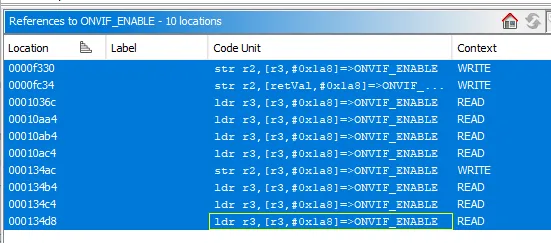
But, we can focus on the READ context only since that is probably where the
binary checks the config before enabling ONVIF functionality. Filter out the
reference in the write_configuration() function earlier, and we’re left with
two callsites:
int FUN_00010a98(void)
{
  int iVar1;

  FUN_00041304(ONVIF_ENABLE);
  FUN_000788f8(ONVIF_ENABLE);
  iVar1 = FUN_0001118c(0xff,ONVIF_ENABLE);
  return iVar1;
}

int FUN_00013480(int param_1)
{
  int iVar1;

  if (param_1 == 0) {
    iVar1 = 0;
  }
  else {
    ONVIF_ENABLE = *(int *)(param_1 + 4);
    FUN_00041304(ONVIF_ENABLE);
    FUN_000788f8(ONVIF_ENABLE);
    write_configuration();
    iVar1 = FUN_0001118c(0xff,ONVIF_ENABLE);
  }
  return iVar1;
}
Right off the bat, because of the call to write_configuration() in function
FUN_00013480(), we know that this is the function that is called when the
ONVIF functionality is changed while the camera is running. The first function,
FUN_00010a98(), is a bit more interesting. Let’s look at what it’s calling:
int FUN_00041304(int onvif_enable)
{
  int iVar1;

  pthread_mutex_lock((pthread_mutex_t *)&DAT_0027b238);
  DAT_0027b1f4 = (uint)(onvif_enable != 0);
  iVar1 = pthread_mutex_unlock((pthread_mutex_t *)&DAT_0027b238);
  return iVar1;
}

int FUN_000788f8(int onvif_enable)
{
  DAT_0030c4cc = (uint)(onvif_enable != 0);
  return onvif_enable;
}
Strangely, there are two data locations where the ONVIF flag is set, so we’ll map it to:
DAT_0030c4cc->ONVIF_ENABLED_1DAT_0027b1f4->ONVIF_ENABLED_2
Unfortunately, I hit a wall here, because both of those variables got passed around a bunch of functions that kept updating different variables.
I also want to check out the string “Starting onvif server on port %s” since my (rather uneducated) guess is that’s where the ONVIF server is started. (God my brain actually works sometimes)
void FUN_00040794(void)
{
  pthread_t __th;
  int iVar1;
  undefined4 auStack_28 [6];
  int *local_10;
  char *onvif_server_port_num_s;

  __th = pthread_self();
  pthread_detach(__th);
  FUN_001fae18(0x2293c8);
  onvif_server_port_num_s = "8000";
  while( true ) {
    while (iVar1 = FUN_00041358(), iVar1 != 1) {
      sleep(1);
    }
    printf("Starting onvif server on port %s\n",onvif_server_port_num_s);
    FUN_0020f62c(auStack_28,0);
    local_10 = FUN_002106bc(auStack_28,onvif_server_port_num_s,FUN_0007893c);
    if (local_10 == (int *)0x0) break;
    FUN_002157e0((int)local_10);
    do {
      FUN_00212158(auStack_28,500);
      iVar1 = FUN_00041358();
    } while (iVar1 != 0);
    FUN_0020f6e8(auStack_28);
  }
  FUN_0020f6e8(auStack_28);
  return;
}
Oh great, so it runs on port 8000! And by referencing the ONVIF_ENABLE_*
variables from earlier, we can guesstimate that there aren’t any additional
checks to enable ONVIF. Here’s the final disassembly I got to:
void check_and_enable_onvif_server(void)
{
  pthread_t __th;
  int is_onvif_enabled;
  undefined4 auStack_28 [6];
  int *local_10;
  char *onvif_server_port_num_s;

  __th = pthread_self();
  pthread_detach(__th);
  FUN_001fae18(0x2293c8);
  onvif_server_port_num_s = "8000";
  while( true ) {
    while (is_onvif_enabled = get_onvif_enabled_2(), is_onvif_enabled != 1) {
      sleep(1);
    }
    printf("Starting onvif server on port %s\n",onvif_server_port_num_s);
    FUN_0020f62c(auStack_28,0);
    local_10 = start_onvif_server(auStack_28,onvif_server_port_num_s,FUN_0007893c);
    if (local_10 == (int *)NULL) break;
    FUN_002157e0((int)local_10);
    do {
      FUN_00212158(auStack_28,500);
      is_onvif_enabled = get_onvif_enabled_2();
    } while (is_onvif_enabled != 0);
    FUN_0020f6e8(auStack_28);
  }
  FUN_0020f6e8(auStack_28);
  return;
}
OK, cool. So how do we actually edit the configuration file, then repack it in a way that the camera will actually accept it?
Well, we know that the configuration file tuya_config.json is at
./extractions/cctv.bin.extracted/760CCC/jffs2-root/tuya_config.json, so instead
of doing the dumb thing from last time where we tried to hex-edit the raw
firmware image, maybe we can edit the file and re-pack a JFFS2 partition image.
But why didn’t the hex-edit work? Well, JFFS2 is a special filesystem that is log-structured, and it’s designed for flash memory devices. I guess it’s sorta like F2FS, which is another filesystem designed for flash memory devices, but unlike its usage on Android devices JFFS2 is designed for flash memory that doesn’t have a wear-leveling mechanism on the hardware side.
What is wear-leveling? TL;DR: Flash chips and SSDs have flash cells. Flash cells have a limited lifespan and don’t like it when you write to them repeatedly. Wear-leveling mechanisms thus try and make sure writes are evenly distributed across flash cells to prolong their lifespan.
Because flash memory can only be addressed in terms of blocks, and because JFFS2 has to handle the wear-leveling mechanism in software, you can’t just overwrite the old block when you change one byte in it (in this case the config option), because you’re then writing to that same spot in memory. JFFS2 thus writes another block to the flash memory with a higher version number.
And like all good filesystems, JFFS2 utilizes checksums for error detection, and from what I can gather, uses a 32-bit CRC. Which means editing just the data portion corrupts that entire block.
Now, I don’t remember if I changed all of the occurrences of onvif_enable last
time or not, but it doesn’t really matter. If a given block is bad, JFFS2 will
go back to the older block with a lower version number. And if I did change
all the blocks and corrupted them, I’m assuming the ppsapp binary then fell
back to sane system defaults, which was probably why I got the chime during
boot.
We can actually grep for the block occurrences in the image:
$ grep -b -a -n "onvif_enable" extractions/cctv.bin
22803:7849741:  "onvif_enable": 0,
22857:7971273:  "onvif_enable": 0,
22932:7997857:  "onvif_enable": 0,
23041:8064473:  "onvif_enable": 0,
23169:8197025:  "onvif_enable": 0,
23195:8197893:  "onvif_enable": 0,
23227:8205921:  "onvif_enable": 0,
23315:8219209:  "onvif_enable": 0,
OK, OK, all that failure analysis is fun and good, but I need a working camera by the end of this blog post. Back to making our own JFFS2 image.
cp -r extractions/cctv.bin.extracted/760CCC/jffs2-root jffs2-root_modifiedThen we edit onvif_enable to 1 in jffs2-root_modified/tuya_config.json.
Finally, repack the JFFS2 image. When we issue the mkfs.jffs2 call, we need to
keep in mind that the file should be in little-endian (because of the Anyka
AK3918), and the erase block size is 4 KB (0x1000), and the image size is 640 KB
(0xA0000), since the entire cctv.bin firmware image is 0x800000 and the JFFS2
image starts at 0x760000. Since the original image was grep-able, we also do
not want any compression.
mkfs.jffs2 -d jffs2-root_modified -m none -e 0x1000 -p 0xA0000 -l --pad=0xA0000 -o new_jffs2.binUnfortunately, this causes the following warning to be printed:
Erase size 0x1000 too small. Increasing to 8KiB minimumThat’s a problem for us, because the original image used an erase block size of
4 KB. Looking through the Linux mailing lists, I came across this thread
where someone already tried to patch mkfs.jffs2 to get rid of the size check,
and it worked fine.
But that’s really strange, because I got curious as to when the check was added,
and found that it was there since the utility was first created. Going through
the Git history and blame for mtd-utils, it seems like the check was
there ever since the initial commit, which was made in April of 2006.
It seemed strange that Tuya would go out of their way to change this value down
to 0x1000 by themselves, but after researching it a bit more
I came across a patch in the official OpenWrt repository. They also patch
the size check down to 0x1000, so I guess it is common for embedded systems!
At any rate, we can do the same thing ourselves:
git clone git://git.infradead.org/mtd-utils.git
cd mtd-utils
git checkout v2.3.1
Then download this patch and apply it:
index da07b69..9a60129 100644
--- a/jffsX-utils/mkfs.jffs2.c
+++ b/jffsX-utils/mkfs.jffs2.c
@@ -1668,11 +1668,11 @@ int main(int argc, char **argv)
                                                  }
                                                  erase_block_size *= units;

-                                                 /* If it's less than 8KiB, they're not allowed */
-                                                 if (erase_block_size < 0x2000) {
-                                                         fprintf(stderr, "Erase size 0x%x too small. Increasing to 8KiB minimum\n",
+                                                 /* If it's less than 4KiB, they're not allowed */
+                                                 if (erase_block_size < 0x1000) {
+                                                         fprintf(stderr, "Erase size 0x%x too small. Increasing to 4KiB minimum\n",
                                                                          erase_block_size);
-                                                         erase_block_size = 0x2000;
+                                                         erase_block_size = 0x1000;
                                                  }
                                                  break;
                                          }
Now we can build mkfs.jffs2:
./autogen.sh
./configure --without-ubifs
make -j$(nproc) mkfs.jffs2
Now we can go back out and use the new mkfs.jffs2 binary to create the image:
cd ..
./mtd-utils/mkfs.jffs2 -d jffs2-root_modified -m none -e 0x1000 -p 0xA0000 -l --pad=0xA0000 -o new_jffs2.bin
And inject it back into the original firmware image:
cp extractions/cctv.bin cctv_modified.bin
dd if=new_jffs2.bin of=cctv_modified.bin bs=1 seek=$((0x760000)) conv=notrunc
Yay, so we just need to flash this new image. Grab the CH341A, flash it with
flashrom, connect it to the Wi-Fi, and…
It doesn’t work.
OK, that’s annoying. Turns out, the function that enables the ONVIF server isn’t referenced anywhere, according to Ghidra anyway. Nor is the function that sets up the RTSP streams.
Perhaps I was reversing code that never gets called.
But hey, we can flash whatever we want to this device, right? Let’s try running
telnetd by editing the initialization step.
./extractions/cctv.bin.extracted/370000/initrun.sh:
#!/bin/sh

BASE_DIR=/opt/pps
if [ -e /tmp/PPStrong.runpath ]; then
        BASE_DIR=`cat /tmp/PPStrong.runpath`
fi

if [ ! -e ${BASE_DIR} ]; then
        exit
fi

tar xzf ${BASE_DIR}/app.tar.gz -C /
umount ${BASE_DIR}

# Run telnet
telnetd -l /bin/sh &

home/init.d/initS &
Repack the image:
cd ./extractions/cctv.bin.extracted/370000/
mkdir tmp
cp initrun.sh tmp
cp app.tar.gz tmp
mkfs.cramfs tmp cramfs_new.bin
And inject it back into the firmware image:
dd if=cramfs_new.bin of=cctv.bin bs=1 seek=$((0x370000)) conv=notruncAnd flash. Does it work?
> nmap -p 23 192.168.8.11
Starting Nmap 7.98 ( https://nmap.org ) at 2026-09-13 16:24 -0400
Nmap scan report for 192.168.8.11
Host is up (0.038s latency).

PORT     STATE  SERVICE
23/tcp   closed telnet
MAC Address: B4:FB:E3:C2:11:BC (AltoBeam (China))

Nmap done: 1 IP address (1 host up) scanned in 2.26 seconds
Why?!
Turns out, the busybox binary built into the camera doesn’t have telnetd.
At this point, I decided to search online if anybody else had ever come across this camera. Surely, Tuya was a massive ecosystem of products and there must’ve been someone who did this before I did.
And there is:
So if you are reading this, thanks @guino.
Going back to the ppsapp binary, I decided to do exactly what he did and just
patch all the calls that have to do with onvif_enable to 1. But I also
decided, just for fun, to just patch out all the checks for the onvif_enable
variable and make sure it would always unconditionally launch the ONVIF server.
It really is satisfying when all the instructions get turned away into nops.
Now, packaging this back into the original firmware is even more annoying than
it already is, because ppsapp is within app.tar.gz, which is again within
the CramFS partition, which is then within the original cctv.bin firmware.
So I guess I have to package it three times now.
(We’ll assume I’ve already copied the modified binary to the directory listed below…)
cd ./extractions/new_wifi_mod.bin.extracted/370000/app.tar.gz.extracted/0/decompressed.bin.extracted.modified/0
tar -czf ../../../../new_app.tar.gz bin etc home
cd ../../../../
mkdir tmp
cp new_app.tar.gz tmp/app.tar.gz
cp initrun.sh tmp
mkfs.cramfs tmp new_cramfs.bin
cd ../../../
cp new_wifi_mod.bin third_try.bin
dd if=new_cramfs.bin of=third_try.bin bs=1 seek=$((0x370000)) conv=notrunc
Unfortunately, after flashing this image, the camera became unhappy and wouldn’t connect to the Wi-Fi anymore, and the blue LED would continuously blink, a change from the usual solid indicator.
I spent several weeks (yes, weeks!) banging my head against the wall, doing all kinds of detours. I found a bunch of UART pads on the board itself and decided it might be worthwhile to hook up a serial monitor to it. I grabbed an Arduino I had lying around and hooked it up, but nothing got printed to the console.
On a hunch, I pulled out my multimeter and my heart dropped when I read 3.3V on the pads. The Arduino Uno ran at 5V. Oops.
Thankfully, I hadn’t fried the board, because I got a USB logic analyzer to determine whether the pads were UART pads at all. And yes, they were UART pads, as evidenced by PulseView:
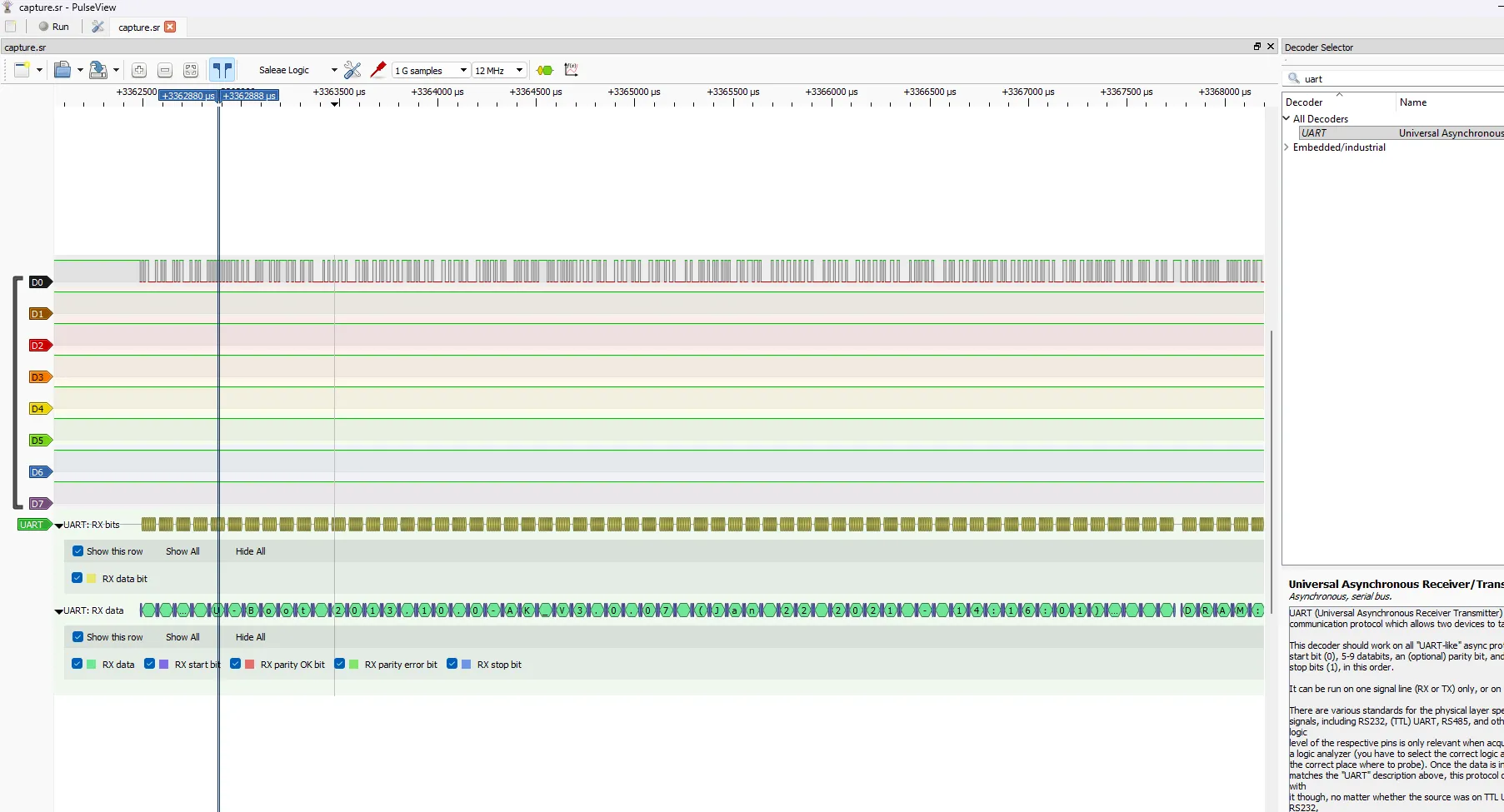
So I bought a proper USB-to-TTL adapter that could do multiple voltage levels. My hope was that something in the boot output would tell me why the initialization was failing.
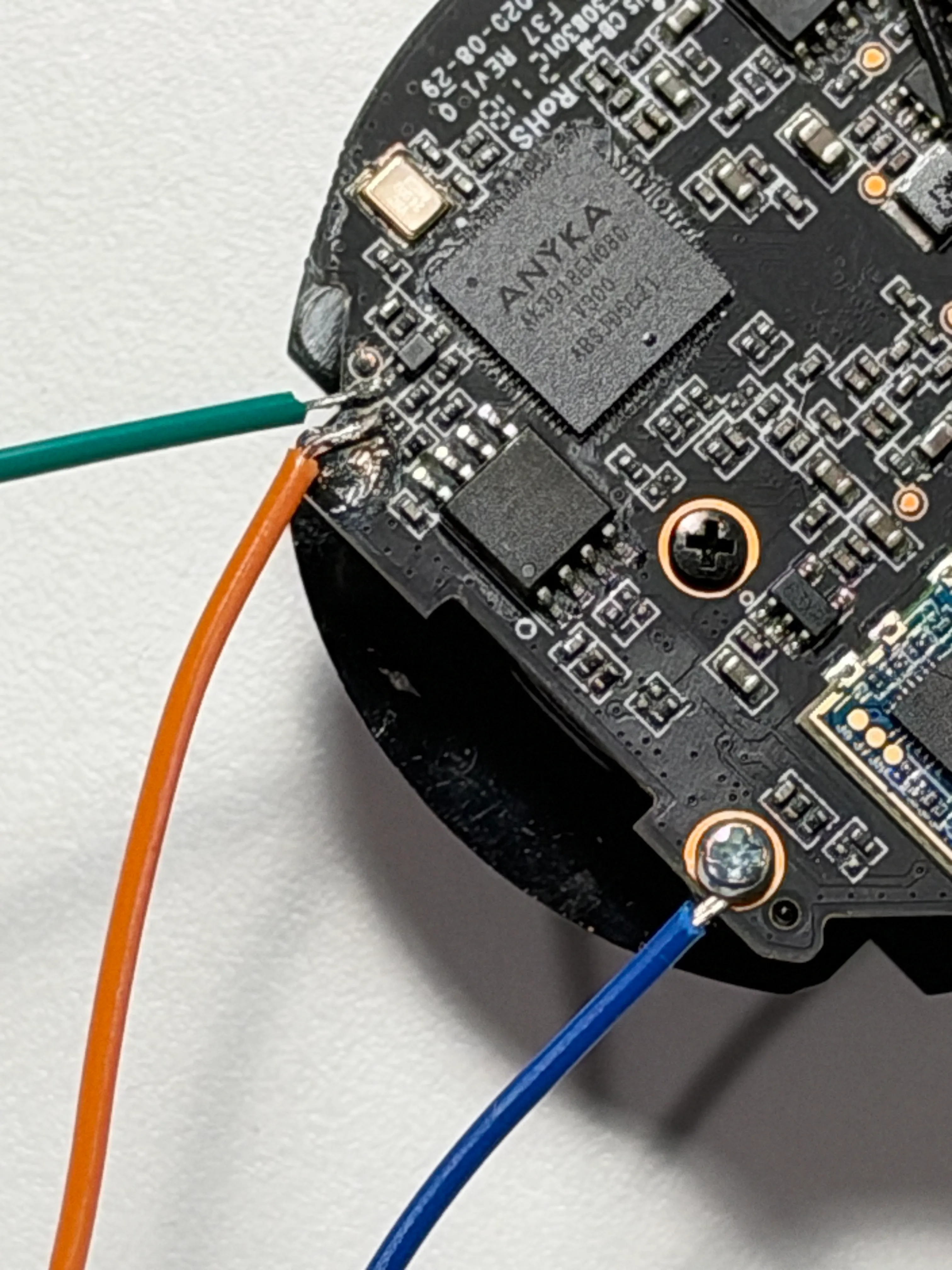
…yeah, that’s me using the screw and pad as a ground because the last pad that is ground refused to wick up solder. Thank god it was that pad and not the TX/RX ones.
However, when I booted up the camera, my hopes were dashed. After the following printout, it just… stopped.
U-Boot 2013.10.0-AK_V3.0.07 (Jan 22 2021 - 14:16:01)

DRAM:  64 MiB
8 MiB
ANYKA SDHC/MMC4.0: 0
PPS:Jan 22 2021 14:16:03   anyka_c3:  3  2  1  0
magic err
magic err
command:setenv bootargs mem=64M console=ttySAK0,115200n8 loglevel=10   mtdparts=spi0.0:256k(bld),64k(env),64k(enc),64k(sysflg),3m(sys),4032k(app),640k(cfg) ppsAppParts=5 ip=192.168.1.99:::255.255.255.0 eth=00:55:7b:b5:7d:f7
## Booting kernel from Legacy Image at 81c08000 ...
   Image Name:   Linux-3.4.35
   Image Type:   ARM Linux Kernel Image (uncompressed)
   Data Size:    2803328 Bytes = 2.7 MiB
   Load Address: 81c08000
   Entry Point:  81c08040
   Verifying Checksum ... OK
   XIP Kernel Image ... OK

Starting kernel ...

Uncompressing Linux... done, booting the kernel.
Anyka Linux Kernel Version: 1.1.12
I tried power-cycling the camera and pressing Enter, to be greeted with a password prompt:
ANYKA SDHC/MMC4.0: 0
PPS:Jan 22 2021 14:16:03   anyka_c3:  3  2  0

please input password::
Hm. What can I do here, really?
I tried a couple of password guesses, but they were all wrong, and each time, the board would reset and start over.
I thought about going through the U-Boot region on the firmware extraction and trying to piece together how the password was compared and where it was stored on memory. But I realized that part wasn’t that interesting to me, so I decided to try giving it to an LLM.
Claude immediately refused:
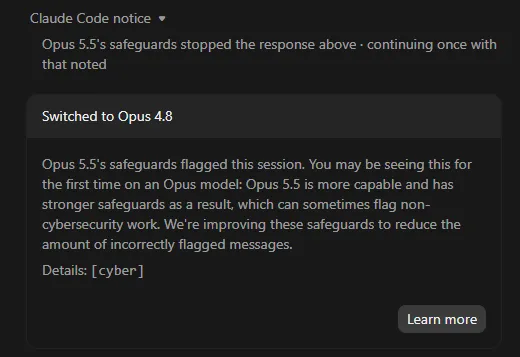
It’d be really funny if the AI bubble popped because the companies are being too responsible, puritan, and hoity-toity about how you use their models.
Fine. If the US won’t help me, China will. I filed a refund request for the Claude subscription which had lasted all but 40 seconds, then went on OpenRouter, created an account, loaded up some credits, then made an API key. I then connected it to OpenCode, selected Deepseek V4.1 Flash 1017, and then told it where I had the firmware binary file, and the specific password string that U-Boot spat out.
After about 3 minutes of searching, it didn’t disappoint:
Yes — it’s in the firmware dump.
U-Boot password: pps_password
I tried it, and it worked. I was in the U-Boot environment!
OK, but this feels like cheating. I’ll admit, it kinda is. I was curious as to what learning opportunity I missed out by giving this task to the LLM, so I expanded the “thinking” portion to see what it had done to get to that output:
The auth routine is at 0x80E07000; it prints please input password:: and compares your input with a string at 0x80E244A8 (file offset 0x246A8).
That string isn’t stored as plaintext — it’s obfuscated with a bitwise NOT. Raw bytes: 8f 8f 8c a0 8f 9e 8c 8c 88 90 8d 9b ff
Inverted gives: pps_password\0
OK, maybe I could’ve gotten this, but maybe not? I don’t know if I would’ve gotten the obfuscation part without a lot more head-meet-table sessions. But personally, that part is not that interesting to me. What is interesting is getting this damn camera to talk to me.
After another LLM prompt, Deepseek told me to append
ignore_loglevel printk.time=1 ppsdebug=onshow to the kernel boot arguments,
so that the ppsapp binary would give me more log output. OK, sure!
loadk
printenv bootargs
setenv bootargs `mem=64M console=ttySAK0,115200n8 ignore_loglevel printk.time=1 ppsdebug=onshow`
bootm 0x81C08000
(Keep in mind that loadk appends a bunch more parameters after the
console=ttySAK0,115200n8 line, like the partition layout of the flash memory.
You need to copy those and append them to after ppsdebug=onshow. I actually
had to remove the log_level parameter entirely, because U-Boot complained
about the command being too long.)
And now we got a lot more log output. I looked at the lines where it was doing the Wi-Fi authentication:
wpa_supplicant service ... [stop] ok
wpa_supplicant service ... [start]
[   21.676261] [atbm_log]:br0_netdev_open()-1116: dev_get_by_name(br0) failed2!wpa_supplicant: can't load library 'libnl-3.so.200'
wpa_supplicant service ... [start] ok
osd set init ok--------------->ak_isp_set_user_params_do 1458, set main osd mem attr

[   22.730306] ak_isp_set_user_params_do 1473 chn:0, paddr:80dbd2a0 size:50400
[01-01 18:12:17:845 TUYA Err][gw_intf.c:598] wf_station_connect error:-1
[01-01 18:12:17:845 TUYA Notice][gw_intf.c:466] stop smt cfg mthd:0
chan:0  set rect ok x:60,y:60,w:[   22.757244] ak_isp_set_user_params_do 1509 paddr:80dca280 size:5600
840,h:60,_,w:1920,h:1080
[   22.774108] [atbm_log]:ieee80211_netdev_ioctrl:cmd err
[   22.779634] [atbm_log]:ieee80211_netdev_ioctrl:cmd err
Hm. Missing library?
Remember when I issued the following command to repack the last image?
tar -czf ../../../../new_app.tar.gz bin etc homeGuess what folders there are when I do an ls?
[ericswpark@stanley 0]$ ls
bin  etc  home  lib
Yeah… oops. Let’s pretend that never happened and try again.
After flashing the new firmware image, we finally got somewhere! The camera
showed back up on the WiFi network, and a network scan showed port 8000 was
open, for the ONVIF server. I tried the admin:admin credentials as @guino
documented, but I got no response back from the server.
Searching online, I found that Tuya cameras basically stop working if you block access to their SDK servers. And indeed, I’d blocked them from ever contacting the outside world.
I decided to ask Deepseek once more to see if it could figure out where in the
ppsapp binary it was doing the online connectivity check. It found the
following offsets:
| Offset | Before | Before instruction | After | After instruction |
|---|---|---|---|---|
| 0x78980 | 00 00 00 0A | beq 0x78988 |
00 00 00 EA | b 0x78988 |
| 0x40E0C | 00 48 2D E9 | stmdb sp!,{r11,lr} |
00 00 A0 E3 | mov r0,#0x0 |
| 0x40E10 | 04 B0 8D E2 | add r11,sp,#0x4 |
1E FF 2F E1 | bx lr |
I tried to make sense of why these patches were important by looking at the
disassembly on Ghidra. The first one was for the ONVIF server, and the decompile
in Ghidra showed that it was the function body of function FUN_0007893c.
With the patch, it removed the else block in the decompiled code, which I
guess was the part that ran whenever it couldn’t reach the Tuya servers.
The other two patches were interesting. It basically turned the entire body
of function FUN_00040E0C into:
undefined4 FUN_00040E0C(void)
{
    return 0;
}
I guess if I learned anything from this, it’s that ARM’s equivalent to x86_64’s
ret is bx lr.
If you’re interested in what the LLM had to say about how the connectivity check worked, you could click below to open up the transcript:
Click here to read the LLM transcript
The ONVIF HTTP handler is FUN_0007893c (vaddr 0x7893c). Before it parses or answers any request, it does this:
if (*ONVIF_ENABLED_1 != 0) {
   if (FUN_00019f50c() != 0) {
       return;              // <-- silently drops the request
   }
   if (event != 0x64) return;
   ... handle HTTP / ONVIF ...
}
FUN_00019f50c reads a global network/cloud state at 0x344230 and returns nonzero for states 1, 2, and 4:
0→ proceed1→ blocked2→ blocked3→ proceed4→ blocked5→ proceed
That state is maintained by a Tuya SDK network-monitor task (FUN_00019fbcc → FUN_00019fa4c) driven by the Wi-Fi and cloud-status callbacks. With internet blocked, the camera can get an IP and listen on 8000, but it never transitions to a “ready” state — so the handler returns before sending a single byte.
After repackaging and building the modified firmware image again, I flashed it,
and got promising results from nmap:
> nmap -p 8000,8554 192.168.8.11
Starting Nmap 7.993 ( https://nmap.org ) at 2026-11-05 21:24 -0500
Nmap scan report for 101846353.lan (192.168.8.11)
Host is up (0.085s latency).

PORT     STATE  SERVICE
8000/tcp open   http-alt
8554/tcp open   rtsp-alt

Nmap done: 1 IP address (1 host up) scanned in 0.21 seconds
And when I checked the RTSP stream…
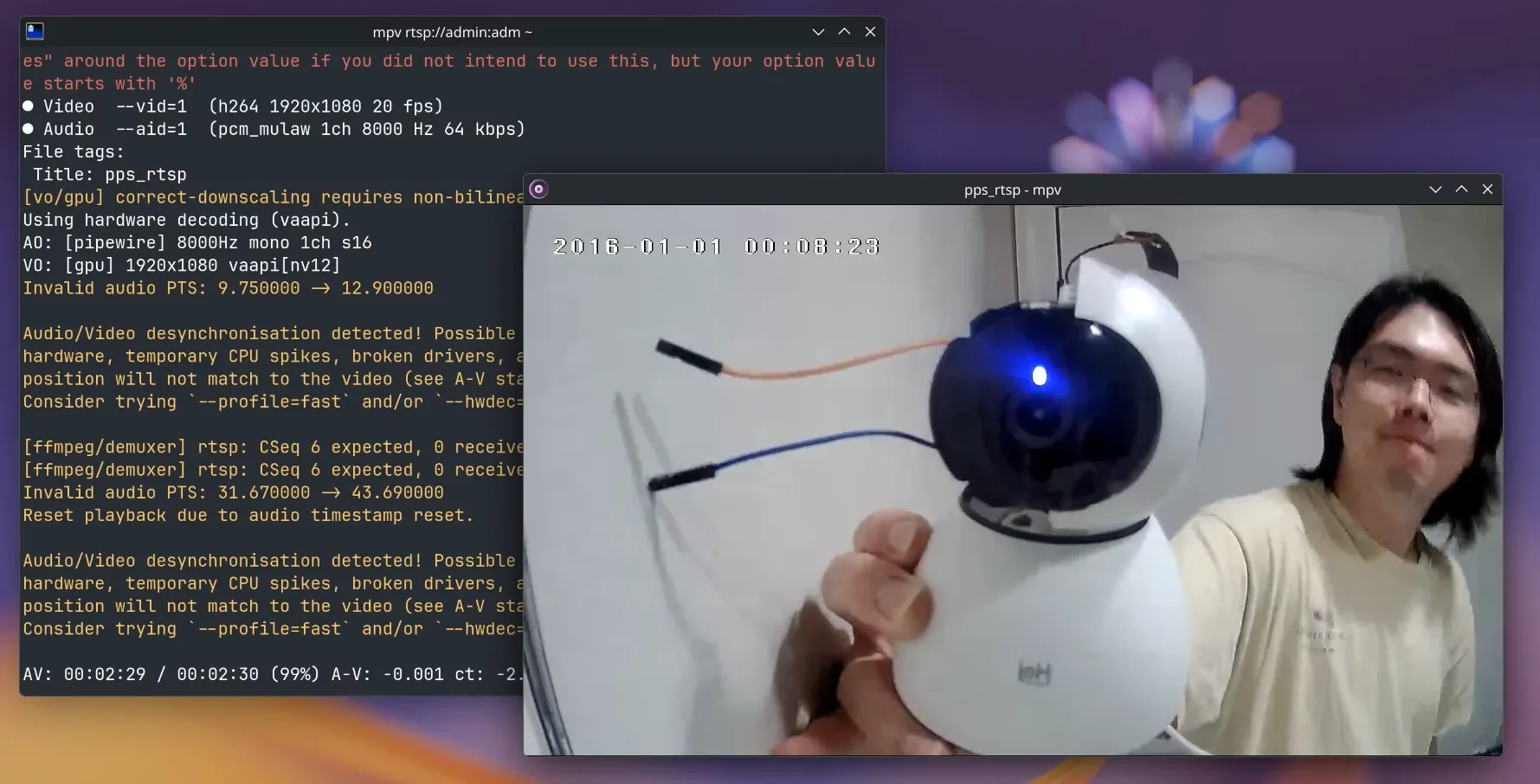
Conclusion
I learned a lot attempting this. But at the same time, the ending might not be quite so satisfying.
On one hand, it feels like I used LLMs as a crutch, because I’m not yet skilled at reading ARM assembly and actually going through the motions of reverse engineering binaries by hand through Ghidra.
On the other hand, I still learned a lot by actually going through the motions of decompressing, searching, soldering, packaging, compressing, flashing, and the large amount of research and time that went into this. I actually started this blog post in the second week of September! Even though I was quite busy with work at the same time, the roughly two months of work didn’t seem wasteful.
I also think that it’s cool that LLMs are making this more accessible, and even though it brings the temptation where you just offload everything to it and have it do all the patching and re-compressing for you to have a perfect working binary firmware image at the end (because yes, I’m sure it could definitely do that now), making sure that you don’t do that and go through the intermediary steps that you know how to do yourself really helps.
Also, for those that are curious: the total cost of running the Deepseek model on OpenRouter was 22 cents. Yes, $0.22. You don’t need an expensive subscription or sell your soul to Altman or Amodei.
Would I try this again? Not for this particular class of camera. As I said in the previous post, this was basically an e-waste camera that a relative of mine gave me for free, and we all know by now to not buy any crap from Tuya. And again, good cameras that don’t pull this bullshit are cheap! I did this just because I wanted to see if I could.